Saturday, September 4, 2010

How To Create a Free PAYPAL Account


Before we get started, do you know what is Paypal? PayPal is a system for making and receiving payments for an individual or business with an e-mail verifiable. PayPal is an e-commerce business allowing payments and money transfers to be made through the Internet. PayPal serves as an electronic alternative to traditional paper methods such as checks and money orders. Let's start!!


Follow these steps :
  • Click PayPal
  • Click "Sign Up Today!"
  • In "Select the country or region where you live" - Choose your country
  • Under "Choose your language preference" - choose your language preference.
  • Then choose a type of plan that suits your needs ( we prefer you to choose PERSONAL) and click on "Start Now".
  • On the next screen fill out the form data and click "I agree. Create my account"
  • Now fill in the details of your international credit card.
  • If you do not have a Credit Card click "Cancel" and Ready! Your free account is created.
Sign Up here now!! 


Advantages of the PayPal system:
  • Buy at many sites over the world, without worry, a good example would be eBay, very famous site, online shopping, which accepts PayPal to receive payments, receive donations.
  • Pay with Visa, Master Card, American Express and others.
  • As an advantage this system gives you the possibility to do your shopping in thousands of international companies without having to disclose the details of your credit card company any more than PAYPAL.
  • It also has a history of movements that can consult at any time.

Sign Up here now!! 


Go online shopping with your PAYPAL account!! :)

credit: pedrog

Thursday, September 2, 2010

How To Select All Friends In Facebook

If you want to invite all your friends in Facebook,  you need to select one by one until you selected all of your friend. It can be tedious. So here's a quick javascript to select all your friends in Facebook so you can invite them all in one quick motion.

Here the javascript :


[Tutorial]

  • Simply copy and paste that into the address bar when you have the friend selector window open. 

Now, you can use it to invite friends to your facebook groups, pages, anywhere the friend picker window shows up!  

ENJOY!!
______________________________________________________________________
credits to:
Don't forget to subscribe to get an Updates from HOW-TO HOUSE on your inbox.


Delivered by FeedBurner
You can ask for more tricks here.
___________________________________________________________________________________

Don't forget to drop your comment.

Any Question or Suggestions? Join our forum at HOW-TO HOUSE Forum.

Sunday, August 15, 2010

How To Make Your Own Air-Conditioner

Nowadays, it's getting hot (actually Asia). This situation make us sweat and feel uncomfortable. If your home has an air-cond, well it's good because you always feel cool. But if you don't have an air-cond, this is How-To make your own Air-Conditioner. And you only need a few bucks to made it! Let's go!!


You will need :
  •  A fan
  • Vinyl / plastic tube
  • Copper tube
  • Aquarium water pump
  • Zipties
  • Ice cooler
  • Scissor

The Result :
 Done!!! Do It Yourself! :)

#credits: bogoshian

Saturday, August 14, 2010

How To Save as PDF With Microsoft Office 2007

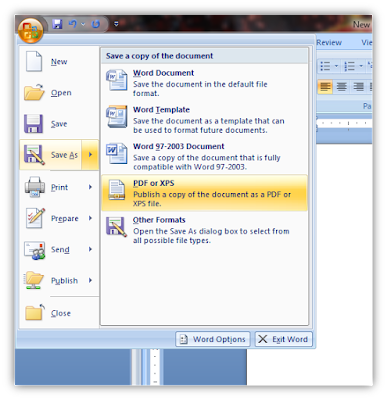
Some of our work in Microsoft Word 2007, we want to save as pdf file but with Microsoft Office we can't save as pdf file. All you need is 2007 Microsoft Office Add-in: Microsoft Save as PDF or XPS. So, this is the How-To @ HOW-TO HOUSE.


[Screenshot]
______________________________________________________________________

Don't forget to SUBSCRIBE to get an Updates from HOW-TO HOUSE on your inbox.


Delivered by FeedBurner
You can ask for more tricks here.
___________________________________________________________________________________

Don't forget to drop your comment.

Any Question or Suggestions? Join our forum at HOW-TO HOUSE Forum.

Saturday, July 31, 2010

How To Make 3D Glasses / Spectacles

Now, 3D is getting popular again. So, How-To House will help you to make your own 3D glasses. It's easy and simple. Everybody can make it. So, don't waste your time guys. Let's start!! 

You will need :
  • Tape or Glue
  • Scissors
  • Red and Blue cellophane

 or you can use this blank template here.

Steps :
  • Just print out the template in A4 paper. HOW-TO HOUSE template above or the blank 3D template.
  • Cut the pieces out around the outside black lines.
  • Cut out red and Blue eye pieces.
  • Tape or glue colored cellophane to the back of the glasses to cover the eye holes.
  • Red cellophane on the left, Blue cellophane on the right.
  • Fold the flaps on the earpieces and tape or glue to the glasses like shown below.

 It will look something like this...

The Result :


    • When the glue's done drying. Explore the magical of 3D with some pictures below.

    Try it now!!!


    Followers

    Sponsor

     
    Powered by Blogger.