Sunday, August 15, 2010

How To Make Your Own Air-Conditioner

Nowadays, it's getting hot (actually Asia). This situation make us sweat and feel uncomfortable. If your home has an air-cond, well it's good because you always feel cool. But if you don't have an air-cond, this is How-To make your own Air-Conditioner. And you only need a few bucks to made it! Let's go!!


You will need :
  •  A fan
  • Vinyl / plastic tube
  • Copper tube
  • Aquarium water pump
  • Zipties
  • Ice cooler
  • Scissor

The Result :
 Done!!! Do It Yourself! :)

#credits: bogoshian

Saturday, August 14, 2010

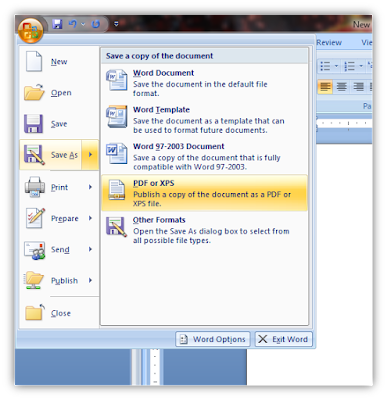
How To Save as PDF With Microsoft Office 2007

Some of our work in Microsoft Word 2007, we want to save as pdf file but with Microsoft Office we can't save as pdf file. All you need is 2007 Microsoft Office Add-in: Microsoft Save as PDF or XPS. So, this is the How-To @ HOW-TO HOUSE.


[Screenshot]
______________________________________________________________________

Don't forget to SUBSCRIBE to get an Updates from HOW-TO HOUSE on your inbox.


Delivered by FeedBurner
You can ask for more tricks here.
___________________________________________________________________________________

Don't forget to drop your comment.

Any Question or Suggestions? Join our forum at HOW-TO HOUSE Forum.

Saturday, July 31, 2010

How To Make 3D Glasses / Spectacles

Now, 3D is getting popular again. So, How-To House will help you to make your own 3D glasses. It's easy and simple. Everybody can make it. So, don't waste your time guys. Let's start!! 

You will need :
  • Tape or Glue
  • Scissors
  • Red and Blue cellophane

 or you can use this blank template here.

Steps :
  • Just print out the template in A4 paper. HOW-TO HOUSE template above or the blank 3D template.
  • Cut the pieces out around the outside black lines.
  • Cut out red and Blue eye pieces.
  • Tape or glue colored cellophane to the back of the glasses to cover the eye holes.
  • Red cellophane on the left, Blue cellophane on the right.
  • Fold the flaps on the earpieces and tape or glue to the glasses like shown below.

 It will look something like this...

The Result :


    • When the glue's done drying. Explore the magical of 3D with some pictures below.

    Try it now!!!

    Saturday, May 22, 2010

    How To Speed Up Your PC System [Tips & Tricks]

    Sometimes our PC are running so slow because of too many program are running at one time or too many program running at start-up. If you run many program, it will use your RAM. This will cause your PC running slow. So, HOW-TO HOUSE have a tricks to speed up your PC system. Here we go :

     Just follow this :
    1. Go to Start Menu, in the search box type 'MSCONFIG' and Hit Enter.
    2. Pop up window will open. Go to Startup Tab.
    3. Untick which program are not important at windows startup. Example Yahoo Messenger, you can run it manually later if you want to use it.
    4. Then, click Ok.
    5. Restart your PC to apply the changes.

    Tutorial

    Now, your PC will run a bit faster than before. Try it! Don't forget to recommend it folks! :)


    related link :
    HOW-TO PC Tips & Tricks
    ______________________________________________________________________

    Don't forget to subscribe to get an Updates from HOW-TO HOUSE on your inbox.


    Delivered by FeedBurner
    You can ask for more tricks here.
    ___________________________________________________________________________________

    Don't forget to drop your comment.

    Any Question or Suggestions? Join our forum at HOW-TO HOUSE Forum.

    Tuesday, April 27, 2010

    How To Watch Youtube And Dailymotion In Windows 7 Media Center

    Are you like to browse any video from Youtube? or like to watch video from Dailymotion? Have you been looking for a way to watch your favorite viral videos from YouTube and Dailymotion from the couch? This is HOW-TO watch Youtube just use plugin which allows you to watch streaming video in Windows 7 Media Center.


    Get Macrotube
    1. Download and install the plugin called Macrotube following the defaults through the install wizard. (Link Below)

    2. After it’s installed, open Windows 7 Media Center and you’ll find Macrotube in the main menu.

    3. Currently there are three services available. YouTube, Dailymotion, and MSN Soapbox. Just select the service where you want to check out some videos.


    4. You can browse through different subjects or categories.


    5. Drill down you search content by date, rating, views, and relevance.


    6. Settings available such as the language beta, auto updates, and appearance.

    7. Now, you can watch any video from Youtube just from your own Windows 7 Media Center


    Notes :  
    This neat project is still in development and the developer is continuing to add changes through updates. It only works with Windows 7 Media Player, but there is a 32 & 64-bit version. Sometimes we experiences certain videos that wouldn’t play and it did crash a few times, but that is to be expected with a work in progress. But overall, this is a cool plugin that will allow you to watch your favorite online content from WMC.

    Link :
    and get more details and troubleshooting help from the GreenButton forum

    Related Link :


    #credits: howtogeek


    Followers

    Sponsor

     
    Powered by Blogger.