Sunday, April 15, 2012

How To Bypass Adf.ly Links in Google Chrome

In the previously, we shared tutorial to bypass shortening service links such Adf.ly in Mozilla Firefox browser. Now, you can bypass Adf.ly links in Google Chrome too. Hey, why don't you register with Adf.ly? You can earn money by shrink your links. Register with Adf.ly here. And if someone use this method to bypass Adf.ly links, it still be count into your Adf.ly account. :D

STEPS:
1. Install this add-on for Chrome - Click here


2. Done! You can try it by go to this see if it's work. - http://adf.ly/7QKm3

Now, you don't need to wait 5 second and click on the "Skip Ad". It will redirect you to targeted link. Enjoy!

Saturday, April 14, 2012

How To Bypass Adf.ly, AdFoc, Ityim, Linkbucks Etc Links in Mozilla Firefox

As we know, Adf.ly is one of the most popular shortening link service which chosen by user all around the world to earn some money. Undoubtedly it is really good to earn monthly income for me as user of Adf.ly service. I highly recommend you to register with Adf.ly. Read this guide to register with Adf.ly.

But visitors hate this shortening link because have to wait for some time before redirect to the actual link. Also have to click on skip ad button. Now you can bypass links from shortening service such as Adf.ly, AdFoc, ityim, linkbucks, urlcash, adcraft etc in Firefox browser. Let's know how!

STEPS:
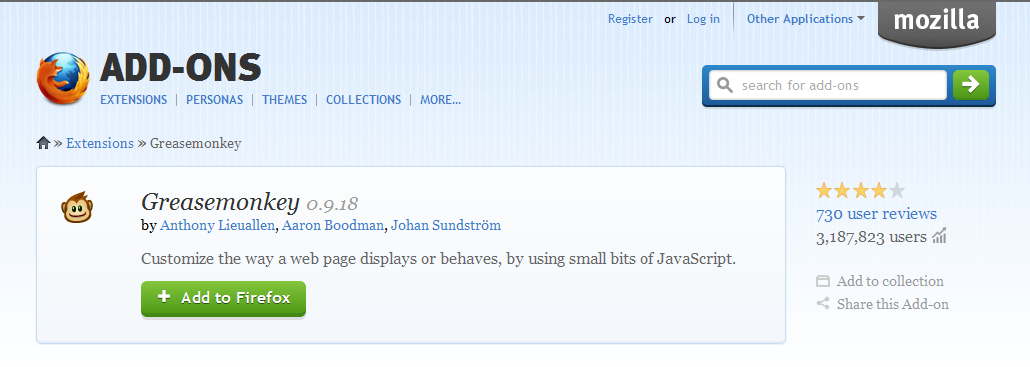
1. Install Greasemonkey add-on. Click here.


2. After that, install user script which is script to bypass those shortening link service.

3. Install AdsFight! userscript for Greasemonkey, Click here. (click Install on the right of the page)

Now you've done. You can try if it's work by click this links --> http://adf.ly/7QKm3


Note: Your Adf.ly links still will be count into your account if someone using this method to bypass your Adf.ly links. Win! :)

Share this tutorial!

Sunday, March 25, 2012

How To Delete Windows.Old Folder

After finished installing you new windows OS, it will leave a folder named as Windows.Old. It is also used a big size of your hard drive. You cannot easily delete it. So, follow this instructions.

STEP TO DELETE WINDOWS.OLD

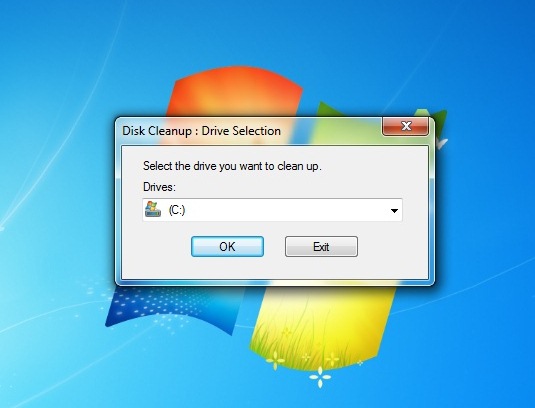
1. Open Disk Cleanup program. Go to Start Menu >> All Programs >> Accessories >> System Tools >> Disk Cleanup


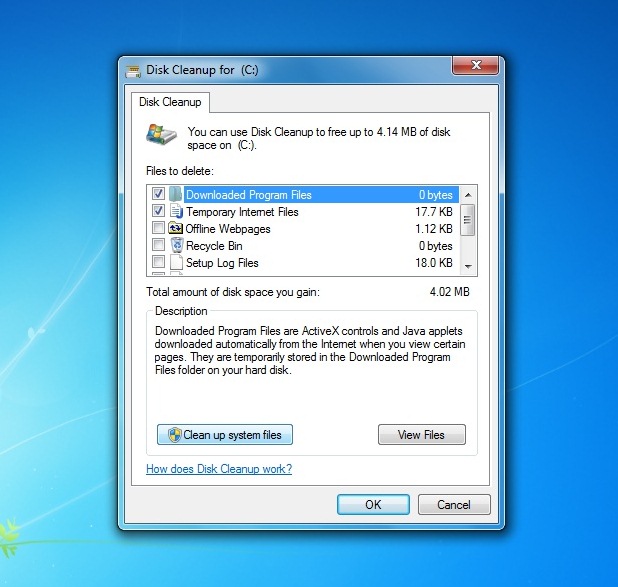
2. Then, click Clean up system files >> Ok


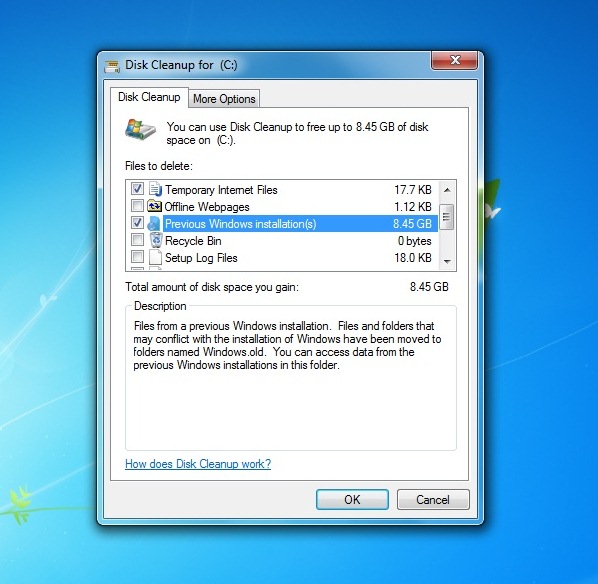
3. After that, check Previous Windows Installation(s), then click Ok.


4. Just wait til' finish.

Now, folder Windows.Old is deleted. :)

Saturday, February 18, 2012

How To Change Back .lnk Files to Normal

The .lnk file extension refers to a shortcut link on your computer, not the actual file. This occurs when you upload the document while the file is still open or if you load the file from the Recent Files folder instead of My Documents, My Computer, or the Desktop. 


This problem make you uncomfortable to use your computer. So let's fix it now.

METHOD #1
1. Open the Registry Editor (click Windows + R, type regedit, hit enter).

2. Navigate to this registry branch:

HKEY_CURRENT_USER\Software\Microsoft\Windows\CurrentVersion\Explorer\FileExts\.lnk

3. Find the subkey called User Choice and delete it.

4. Close Registry Editor.

5. Reboot your PC.


or METHOD #2
Just run this tool to fix it automatically;

#Window 7
#Windiws Vista


No more .lnk files. Enjoy guys! =)

Thursday, February 16, 2012

How To Bypass Survey To Continue Download in Most Website

This surveys always annoys user and make us not interested to download the file we want. It kills our interest. The site like sharecash use this surveymethod to earn some money. The surveys is look something like this:


You wanna get rid from this annoying survey? Actually it's really easy to bypass the freakin' survey. Let's know how.

BYPASS SURVEY
All you need to do is DISABLE JAVASCRIPT.

Mozilla - Go to Options ->> Content ->> Uncheck Enable Javascript.


Same goes to other browser. Just DISABLE JAVASCRIPT.

Easy aite! Enjoy your downloads! =)


Followers

Sponsor

 
Powered by Blogger.